Connect a company
For your first company, follow workspace setup. Connect your AI client, then choose Connect to QuickBooks, authorize the company in Intuit, and wait for the initial sync on Clients.Check or restore a connection
Read the connection and last-sync columns on Clients:
Disconnecting stops access and keeps the client on the roster. Remove is
a separate action after disconnecting: it removes the roster entry and synced
books while retaining plans, review decisions, runs, and the work log.
Do not remove a company merely to refresh its data.
For more checks, see a missing or stale company.
Choose the guide for your ledger
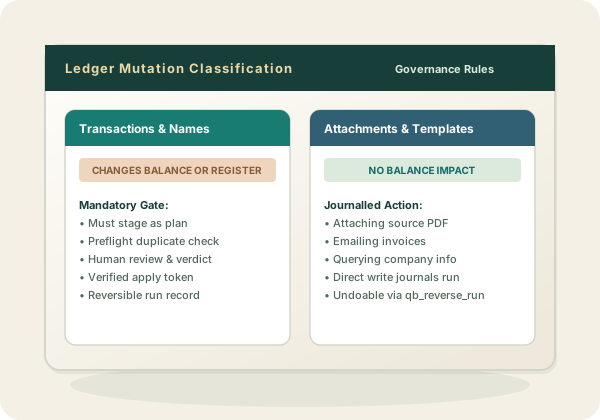
What the QuickBooks Online connection covers
Reading: the chart of accounts, customers, vendors, items, employees, currencies, tax codes, budgets and transactions, plus QuickBooks’ own reports run live. Writing: the transaction kinds a bookkeeper works in — bills, checks, card charges and credits, deposits, transfers, journal entries, invoices, credit memos, sales receipts, refunds, payments received, bill payments, vendor credits, estimates, purchase orders and time — and the list names behind them: accounts, customers and jobs, vendors, items, classes, locations, terms, payment methods, employees, currencies and tax codes. A plan can propose names and postings together, which is what makes a migration reviewable: the chart of accounts, the customer list, and the history that references them arrive as one batch, and a reviewer can strike a proposed name as readily as a proposed entry. The full list is in the tool surface. Beyond posting, the hosted connection also carries QuickBooks-native work that has no plan around it because it changes no balance: emailing an invoice or estimate, fetching a rendered PDF, attaching a source document to a transaction, recurring templates, company preferences, and the entitlements that decide whether classes, locations, purchase orders, and budgets are available at all.